Digital tachograph printout: what each symbol means and what to hand DVSA when they knock
I watched a driver press tachograph buttons for two minutes at Knutsford, hand over something useless, and spend fifteen minutes at the roadside. Nobody ever showed him. Here is what a correctly produced digital tachograph printout contains.
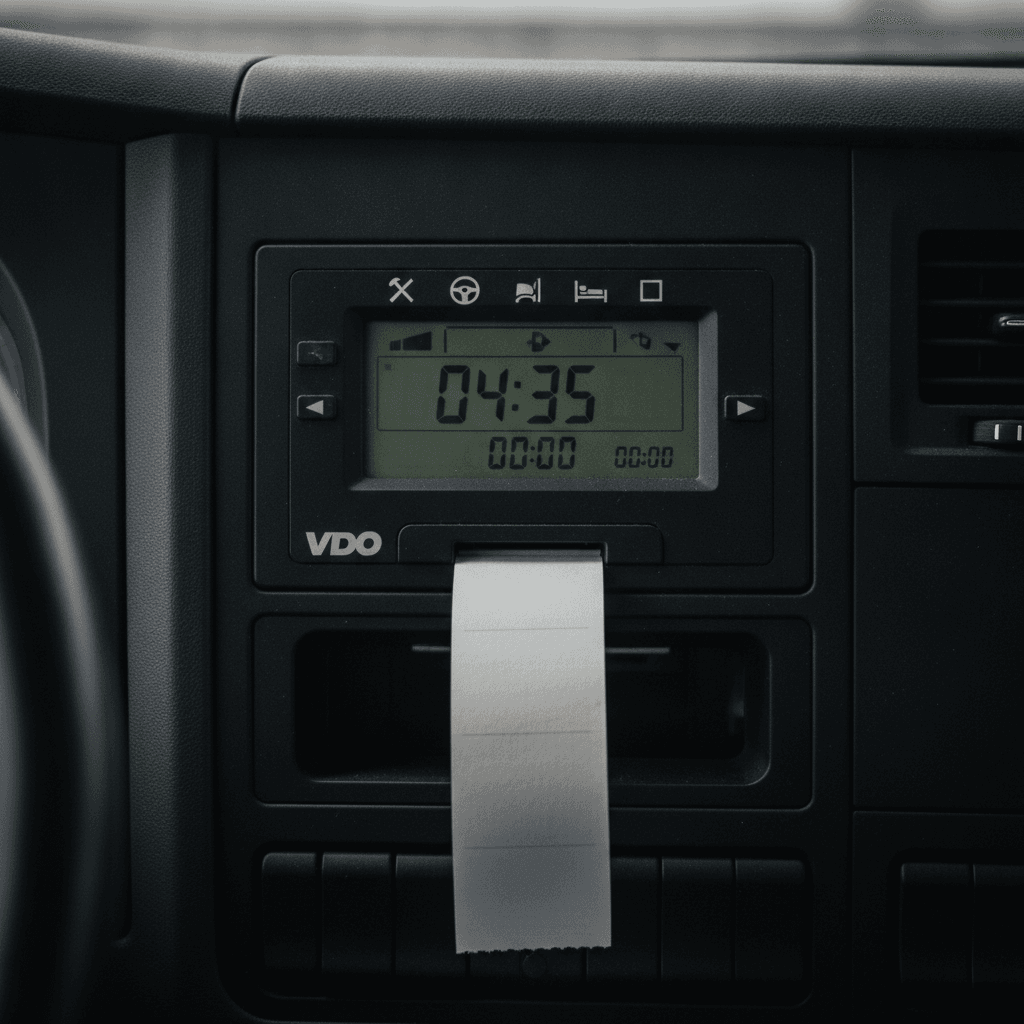
The printout that most drivers have never actually looked at
Last year I watched a DVSA traffic examiner at Knutsford ask a driver for a printout from his digital tachograph. The driver pressed buttons for about two minutes, handed over something that showed a single line of data, and spent the next fifteen minutes standing at the side of the road while the examiner explained what was wrong with it.
It wasn't a malicious failure. The driver just didn't know what the printout was supposed to contain. I've been running HGV fleets for eighteen years and I can tell you — most drivers don't. They know the card goes in slot one. They know the 4.5-hour driving limit. What they often don't know is what happens when the examiner says "print me your daily record."
So here's what's on a correctly produced digital tachograph printout, what each part means, and what DVSA is actually looking for when they ask for one.
What triggers the need for a printout
There are two main situations. First: a DVSA examiner asks for one at a roadside stop or a premises visit. Second: a driver's card is lost, damaged or not working, and they need to keep driving — in that case they must produce a printout at the start and end of each period of driving, up to a maximum of fifteen calendar days, until the replacement card arrives. That second scenario is covered in separate posts. This one is about the first.
Under Article 35 of Regulation 165/2014 (assimilated into UK law), a driver must be able to produce a printout on request. At a DVSA roadside check, the driver must carry records for the current day plus the previous 28 calendar days for domestic GB operations. For international journeys to or from EU member states, that extends to the previous 56 days. The examiner will typically focus on the current day and recent days — but they have the right to inspect the full 28 or 56 days if they choose.
What a properly produced printout actually shows
A standard driver activity printout from a digital tachograph head — whether it's a VU 200, Stoneridge SE5000 or similar — will show the following sections:
Header section
This is at the top. It gives the vehicle registration, the workshop ID that last calibrated the unit, the current odometer reading and the date and time of printing. Check that the VRN on the printout matches the vehicle. Sounds obvious — but when a driver moves between vehicles in a day, this is where errors surface.
Card and driver identification
Name of the driver, driver card number, the issuing member state. If the printout shows the wrong name or a blank, that's a problem. A blank card ID means no driver card was inserted, which is itself an infringement unless the driver is making a manual entry for a period out of scope.
Daily activity for the current day
This is the core of it. Activities are shown using standardised pictograms:
- Steering wheel icon — driving time
- Hammer and wrench — other work (loading, admin, vehicle checks)
- Two vertical bars — availability (waiting for loading/unloading, on standby, multi-manning rest in moving vehicle)
- Bed/sleep icon — rest or break
Each activity block shows start time, end time and duration. The cumulative driving total for the day builds up down the page. At a roadside check, the examiner is looking at whether the driver has hit the 4.5-hour continuous driving limit, whether breaks have been taken correctly (either 45 minutes in one go, or 15 then 30 in that order — never the other way round), and what the daily driving total is against the 9-hour or extended 10-hour allowance.
Speed data (vehicle unit, not the printout)
One thing I want to be clear about here: the printout from the driver card does not show speed data. Detailed last-24-hours speed data lives in the vehicle unit, not on the card. If DVSA wants speed data, they'll read from the vehicle unit, not the printout. I've seen operators get confused about this — the printout is an activity record, not a speed trace.
Infringement flags
Modern tachograph heads flag detected infringements on the printout. You might see codes like "over-speed event" (if the vehicle unit has exceeded calibrated speed thresholds), "driving without appropriate card" or "card session conflict." These are logged by the vehicle unit. A clean printout with no flags is what you want — but the absence of flags doesn't mean the driving was legal, because the full analysis happens when the data is properly downloaded and processed by analysis software.
What DVSA actually reads first
From my experience of roadside stops and from talking to transport examiners over the years, the sequence is roughly this:
First, they check the header to confirm which vehicle and which driver. Then they look at the current driving session — how long has the driver been driving since their last break? If that's clean, they'll often work backwards through the day's record. If there are flags or if something looks off (a suspicious gap, an availability period at an odd time), they'll dig further.
What they're not doing at the roadside is a full 28-day analysis. That's what happens back at the examination centre, or during a premises compliance visit. A roadside stop is a snapshot. The printout is primarily being used to check whether the driver is legal right now, today, on this journey.
The 15-minute rule most operators miss
Here's one that catches operators out. Article 7 of Regulation 561/2006 says the 45-minute break can be split into two parts — 15 minutes first, then 30 minutes after. The 30 must come after the 15. If a driver takes 30 first and 15 after, it doesn't count as a valid split break. The printout will show the timing of each break period, and if the order is wrong, the analyser will flag it as a break infringement.
I had a driver who'd been doing this wrong for three months. Clean on the road each day, because no single period exceeded the 4.5-hour limit. But the order was wrong every time. When DVSA pulled six weeks of data at a premises visit, he had twenty-seven break order infringements. That conversation with the Traffic Commissioner was not pleasant.
Printout vs full download — knowing the difference
A printout is not the same as a download. I want to be direct about this because I've seen transport managers confuse the two.
A download copies the full digital data from the card (or vehicle unit) to a file that can be processed by analysis software. This is what you need for your 28-day operator download obligation. A printout is a paper output from the tachograph head — it's a human-readable summary of what's on the card, but it doesn't transfer the raw data and it doesn't satisfy the download obligation.
When an examiner asks for a printout, they're asking for the paper. When they ask for your download records, they want the digital files. Don't hand over a printout and say "here's the download" — they'll know immediately that you've confused the two, and it won't go well.
What goes wrong with printouts in practice
The failures I see most often:
The printer paper runs out. This sounds trivial. It isn't. No paper in the tachograph head means no printout on demand. I do a paper check every week now. It takes about eight seconds per vehicle.
The driver presses the wrong sequence. Most tachograph heads have a menu system. The "daily print" option is usually one or two button presses from the main menu, but a driver who's never been shown it properly will press things at random and produce something that doesn't show what the examiner needs. Brief your drivers on the exact button sequence for their specific unit. It varies by manufacturer.
The printout is torn or unreadable. A thermal printout left on a hot dashboard fades fast. I've had drivers produce printouts where half the data was invisible because the paper had been in the sun. If a printout is illegible, it's functionally useless at a roadside check.
Clock discrepancy shows up. Tachograph units must maintain UTC time. If the vehicle unit clock drifts, the times on the printout won't match real time. Any discrepancy of more than one minute is recorded as an event by the tachograph head. DVSA can see these events — and a persistent clock drift suggests either a calibration issue or tampering.
Brief your drivers before they get pulled, not after
The fix for all of this is straightforward. Print out an example from each type of tachograph head on your fleet — your Stoneridge SE5000, your VDO DTCO, whatever you're running — and go through it with every driver. Show them what each symbol means. Walk them through the button sequence to produce a daily print. Make sure they know the difference between a daily print, a 24-hour print and a full card print.
Do it during a driver induction and again at the annual driver review. Five minutes. That's all it takes. The driver at Knutsford who couldn't produce the right printout had been driving for seventeen years. Nobody had ever shown him.
When you need a printout without a card
If a driver's card has failed — cracked, chip unreadable, stuck in the reader — and they need to keep driving, they must make manual entries for out-of-card activities and produce a printout at the start and end of each working period. Article 29 of Regulation 165/2014 covers this. The printout at the start records the activities the card last stored. The printout at the end records the activities since the card failed.
The driver must apply for a replacement card within seven calendar days of the failure. They can keep driving on manual entries and printouts for up to fifteen calendar days while waiting for the replacement. Day sixteen — they stop until the new card arrives.
Keep all the printouts. They're the evidence that the driver was operating lawfully during the gap period. Without them, the period shows as "no data" on analysis, which flags as a missing data infringement.
What the examiner takes away
At a roadside check, the examiner will usually make a copy of relevant printouts (they have equipment to do this) or photograph them. They'll note the driver details, the activities and any flags. If the printout is clean and the conversation goes smoothly, you're on your way.
If there's something wrong — a break infringement, driving time over the limit, a flagged event — the examiner records it on their system and it feeds into OCRS. Whether it results in a fixed penalty, a prohibition or just a warning depends on the severity and the operator's history. A single break infringement in an otherwise clean record usually gets a warning. A pattern of infringements gets considerably more attention.
Know what's on your drivers' printouts before DVSA does. It's not a difficult thing to check.